 Ali PDF Editor
How to fill out a scanned PDF form
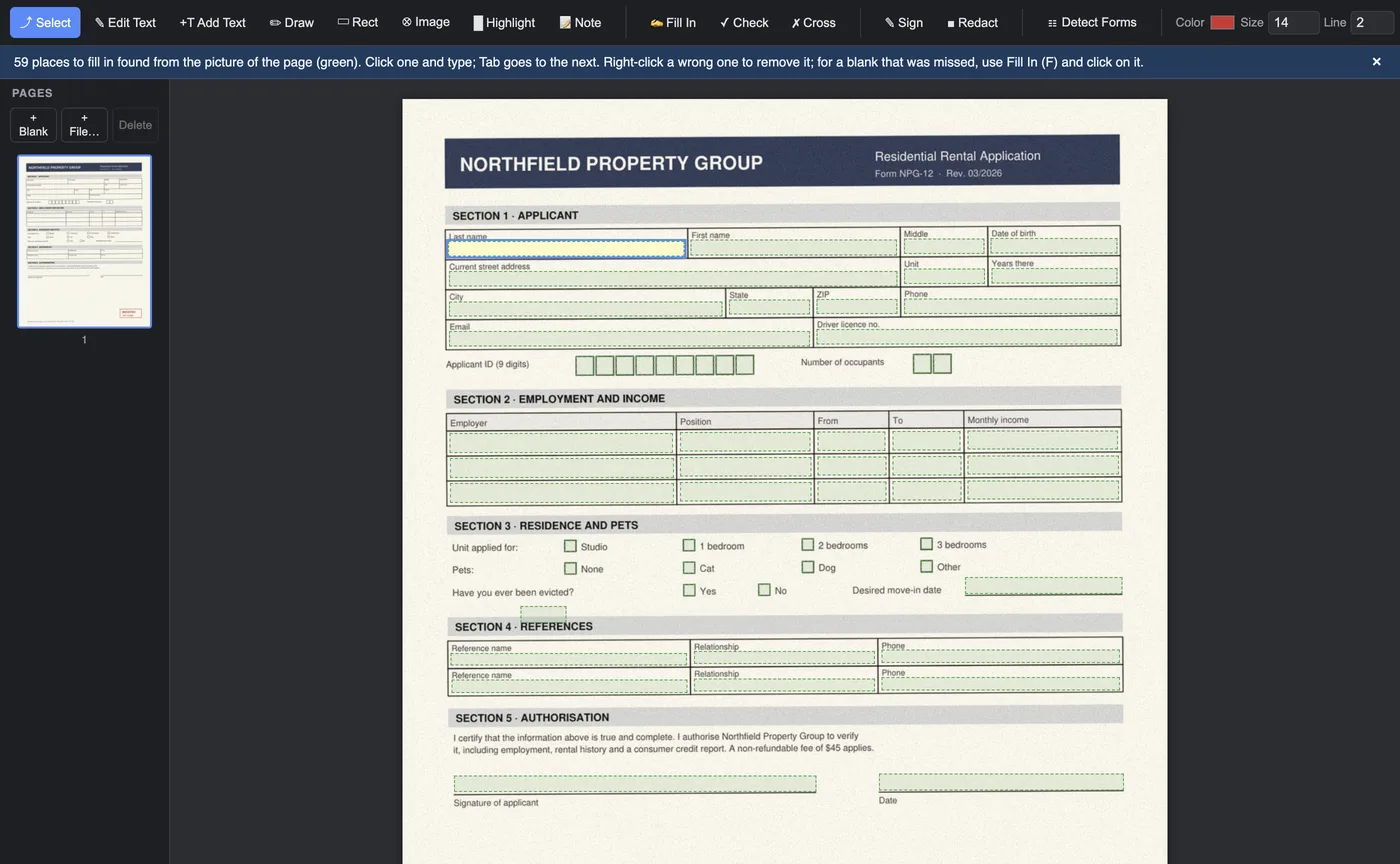
A scanned form is a photograph of paper. Open it in an ordinary PDF reader and there is nothing to click: no boxes to type into, no check boxes, no text. You could print it, fill it in with a pen and scan it again, or squeeze typed text in by hand with a text tool. Ali PDF Editor does the work for you: it looks at the picture of the page, finds the boxes, writing lines and check boxes a person would write in, and turns them into real fields you can type into.
Everything happens on your own computer. The form is never uploaded, so this is safe for tax forms, medical forms, leases and anything else with personal details on it.
Fill out a scanned form in five steps
- Open the scan. Drag the PDF onto the window, or use File > Open. A form scanned on a flatbed, photographed and saved as PDF, or received by fax all work. A slightly crooked scan is fine: the page is straightened before the blanks are looked for.
- Click Detect Forms in the toolbar. The blanks turn green within a second or two per page. A few seconds later each one is named after the words printed beside it (Last name, ZIP code, Date of birth), which you see when you point at the field and in Tools > Fields List.
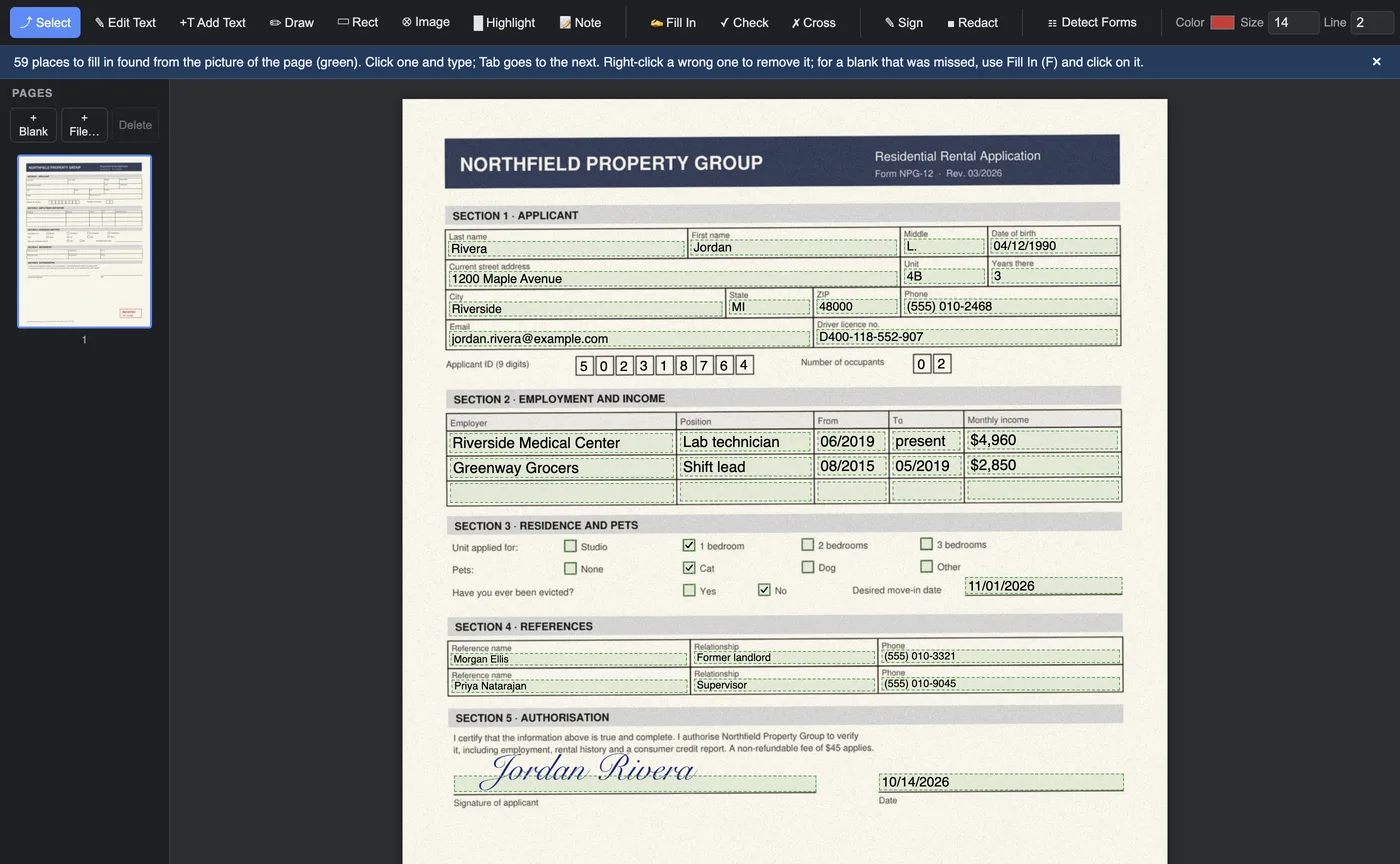
- Click the first field and type. Tab goes to the next one, Shift+Tab back. Click a green square to tick it. Writing shrinks to fit its box as you type.
- Sign. Click a signature line and your signature goes on it, sized to the line. Draw it once, type it, or use a photo of it; it is kept for next time.
- Save. What you typed is saved as real form fields, so you, or anyone you send the file to, can open it later in any PDF reader and change it. For a copy that can no longer be changed, use File > Save Filled Copy (Flattened).
Let the form fill itself where it can
Typing the same name and address into every form gets old. Ali PDF Editor helps in three ways:
- Values are written the way the field asks. Nine digits in a social security field become 123-45-6789; a phone number becomes (555) 010-2468; an amount becomes 1,850.50; a date follows the order the label shows (MM/DD/YYYY or DD/MM/YYYY). Type today in a date field and today’s date goes in.
- My Details. Under Tools > My Details you keep your name, address, phone, email and date of birth, on your computer only. Tools > Fill In My Details then fills every empty field that asks for one of them, in one click. Fields for a spouse, an employer or a preparer are left alone, and identity numbers are never stored.
- Check-one groups. Where the form says “check one”, ticking a box unticks the others, as on paper.
A form that is already partly filled in
Many forms arrive half done: someone typed the company name and address, and you only need to add the rest. Detect Forms recognises boxes that already hold an answer, ticked check boxes and lines with writing on them, and leaves them alone. The message says how many it skipped, and the cursor starts in the first empty blank, so you only see what is left to fill.
When a blank is missed or a field is off
No detector finds every blank on every scan, Adobe’s included. Fixing one takes a second:
- A field in the wrong place: point at it. Drag the handle at its top left corner to move it, the one at its bottom right to resize it, or click × to remove it.
- A blank that was missed: choose Add Field (A) and drag a box over it. A small square becomes a check box.
- Writing anywhere else: choose Fill In (F) and click where the words should go, or Check (C) and Cross (X) to mark a box.
- The wrong kind: right-click a field to make it a date, phone, amount or ID field, or to write it one character per cell for forms with a box per digit.
How well does it work?
We measure Detect Forms on scans of real public forms that are drawn, degraded and tilted like real scans, and count how many blanks it finds. On IRS forms it finds about 94% of the blanks on clean scans and 91% on dark, blurry ones. On forms of other agencies, which it has never been tuned on, it finds about 80% on clean scans. The rest takes a few clicks with Add Field. Each version is measured before it is released.
Questions
Do I need Adobe Acrobat to fill out a scanned form?
No. Ali PDF Editor finds the blanks of a scanned form by itself and saves what you type as standard PDF form fields, which Acrobat, Preview, Chrome and phone readers all open.
Is my form uploaded anywhere?
No. The form is read and filled on your own computer. The app only contacts our server to start the free trial and to check the license, never with your documents.
Can I fill out a scanned form on Windows?
Yes. Ali PDF Editor runs on Windows 10 and 11 (from the Microsoft Store or as a direct download) and on Macs with Apple Silicon or Intel, with the same features.
What if the scan is crooked or faint?
The page is straightened before the blanks are looked for, and faint or dark scans are handled as well. A blank that is still missed can be added with one drag.
Try it on your own forms. The download is the full app, free for seven days, no card. Then $8.99 once, for life, on up to three computers.
Download for Mac or Windows