 Ali PDF Editor
How to fill in a PDF that is not fillable
Some PDF forms are “flat”: the boxes and lines are only drawn, with no form fields behind them. Click on them in a normal reader and nothing happens. Government forms printed and scanned, forms exported from a word processor, and old forms made before fillable PDFs were common are all like this.
Ali PDF Editor fills them in two ways, and you can mix them on the same page.
The quick way: Detect Forms
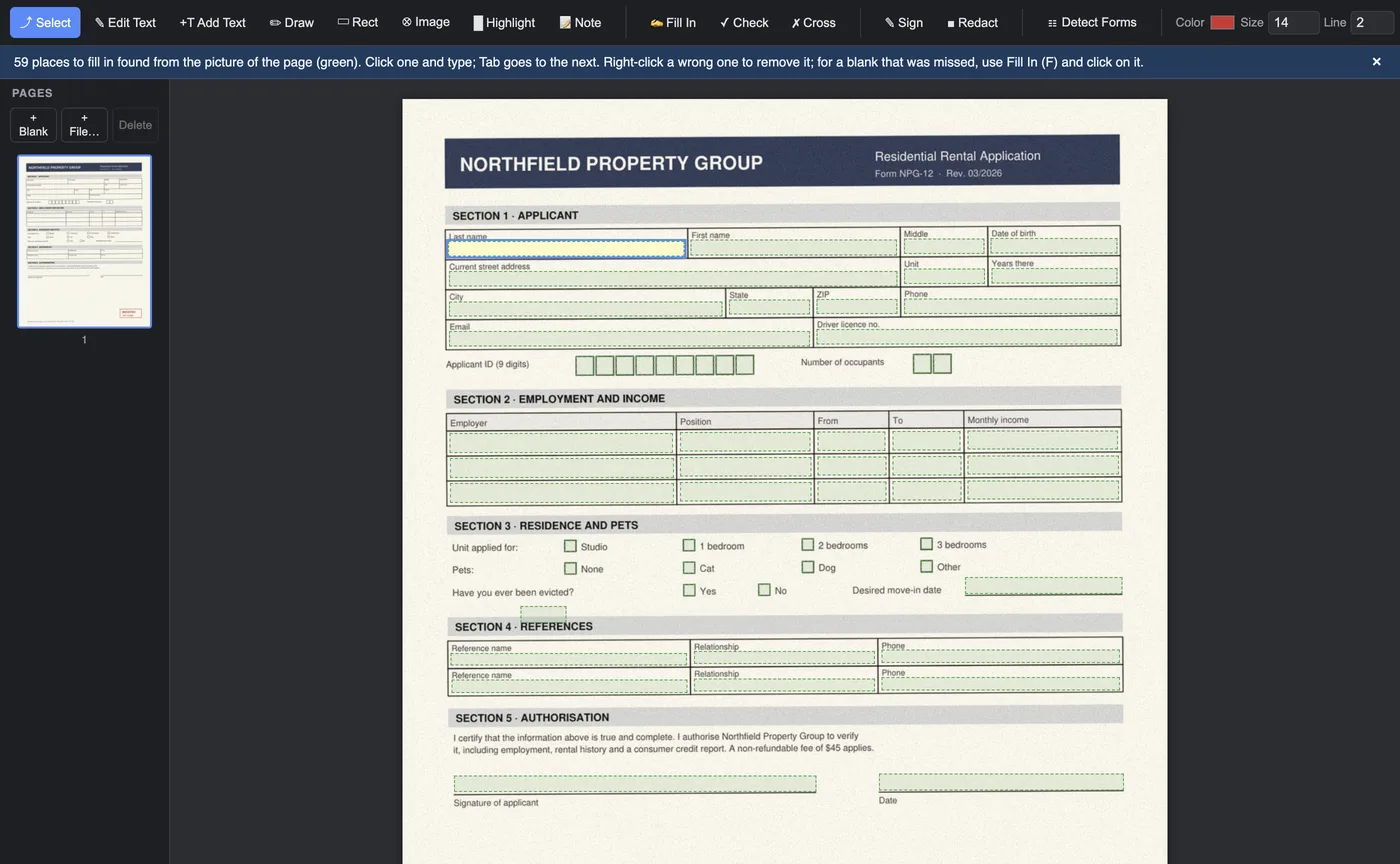
Click Detect Forms in the toolbar. Ali PDF Editor reads the page, finds the boxes, table cells, writing lines and check boxes, and puts a real form field on each one. It works on PDFs whose lines are drawn as vectors (a form made on a computer) and on scans (a picture of paper). The fields turn green; click one and type, and Tab takes you to the next.
Because they are real PDF form fields, what you type stays editable: open the file again next week, in Ali PDF Editor or any other PDF reader, and change it. The fields are named after the words printed beside them, so a screen reader or another app knows what each one is for.
The free-hand way: Fill In, Check and Cross
For a form with blanks that are hard to see (a dotted line, a space after a colon) or for writing outside the blanks, use the fill tools:
- Fill In (F): click where the writing should go, at the height of the letters, and type. Enter or Tab finishes. The Size box sets the size; 11 suits most forms.
- Check (C) and Cross (X): click inside a box to tick it or cross it.
- Add Field (A): drag a box over a blank to make a proper field of it.
Anything you placed can be moved: point at it, and drag the round blue grip at its top left corner. To correct a word, click it with Fill In and it opens for editing.
Make your answers look right
- Formats: a social security number, a phone number, an amount or a date is written the way the field expects as soon as you leave the field.
- Fit: writing shrinks to fit its box, on screen and in the saved file.
- Your details in one click: Tools > Fill In My Details puts your saved name, address, phone and email into every empty field that asks for them.
- Signature: click a signature line to put your signature on it.
Save, send or print
Save keeps your answers as editable fields. File > Save Filled Copy (Flattened) makes a copy where the answers are part of the page, which is what some offices ask for and what prints the same everywhere. Every save is checked before the file is written, so a form is never left damaged halfway.
Questions
Why can't I type into my PDF form?
Because the form has no fillable fields: its boxes are only drawn. Detect Forms in Ali PDF Editor adds the fields, or you can type anywhere with Fill In.
Will the person I send it to be able to read my answers?
Yes. The answers are saved as standard PDF form fields with their own appearance, so they show in Acrobat, Preview, browsers and on phones. A flattened copy turns them into part of the page.
Does it work without an internet connection?
Yes. Everything is done on your computer; the internet is only needed to start the free trial and, about once a week, to confirm the license.
Try it on your own forms. The download is the full app, free for seven days, no card. Then $8.99 once, for life, on up to three computers.
Download for Mac or Windows